What Is Land Mutation in Gujarat?
When you buy, inherit, or receive land as a gift in Gujarat, two separate records must be updated. The first is the registration record at the Sub-Registrar office — that is where the sale deed is stamped and registered. The second is the revenue record — where the government notes who actually owns the land for tax and administrative purposes.
Land mutation is the process that updates the revenue record. In Gujarat, it is officially called Hakkpatrak or Ferfar. The change gets recorded in Village Form 6 (VF-6), the Register of Mutations maintained at every Taluka. Once mutation is complete, the new owner's name appears in the 7/12 Satbara Utara (VF-7) and the 8A Khata (VF-8A).
Mutation does not transfer legal title. That happens at registration. But without mutation, the revenue records still show the old owner's name — which creates problems for loans, government schemes, succession, and future sales.
When Is Mutation Required?
Gujarat law requires every person who acquires land rights to report the change to the Taluka authority within three months of the acquisition. Missing this deadline can attract penalties and complicate future transactions.
| Situation | Type of Mutation | Trigger Document |
|---|---|---|
| Property purchased | Sale (Vechan) Mutation | Registered Sale Deed |
| Owner passed away | Inheritance (Varsai) Mutation | Death Certificate + Heir proof |
| Property received as gift | Gift (Dan) Mutation | Registered Gift Deed |
| Land divided among heirs | Partition (Bhagbatai) Mutation | Registered Partition Deed |
| Court decree transfers land | Court Decree Mutation | Certified Court Order |
| Land exchanged between parties | Exchange (Adlabadhli) Mutation | Registered Exchange Deed |
| Minor heir turns 18 | Minor to Major Mutation | Age proof (School Certificate) |
| Bank creates mortgage charge | Encumbrance Mutation | Bank loan documents |
Gujarat law lists 35 identified mutation types. Most citizens deal with sale, inheritance, gift, and partition mutations. The process is the same for all of them — the difference is only in the supporting documents.
How to Apply for Land Mutation in Gujarat via e-Dharah
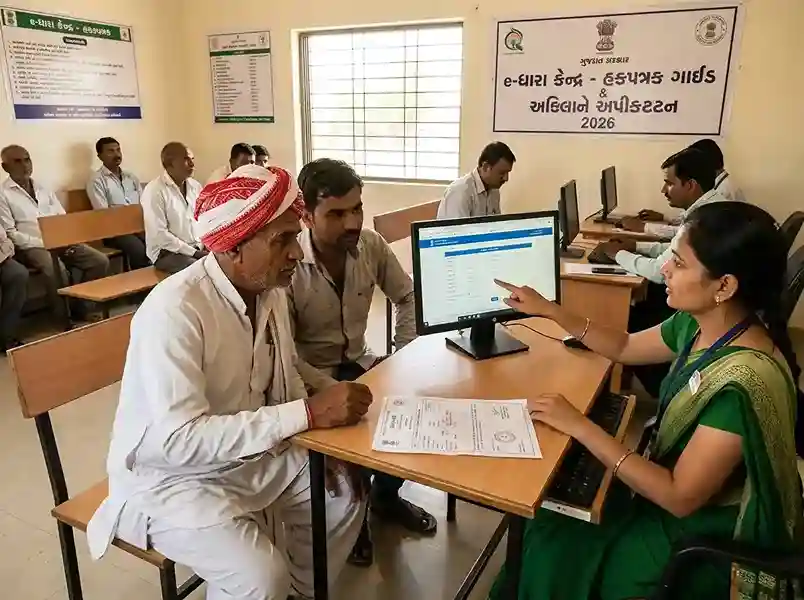
In Gujarat, land mutation is processed through the e-Dharah system at every Taluka Mamlatdar Office. There are 225 e-Dharah Kendras across all talukas in the state. You submit the mutation request at the kendra — the operator enters your data into the WebBhulekh system — and the entire verification process runs digitally from there.
There is no standalone online portal where you submit everything from home for mutation. You must go to the e-Dharah Kendra at least once to initiate the application. However, you can track status and verify the final entry from home at anyror.gujarat.gov.in.
-
1
Collect and prepare all documents
Get the mutation form from the Revenue Department website or pick one up at the e-Dharah Kendra. Gather all supporting documents based on your mutation type. See the complete document list in the next section. Carry originals and one clear photocopy set.
-
2
Visit the e-Dharah Kendra at your Taluka Mamlatdar Office
Locate the e-Dharah Kendra for your Taluka. It is inside the Taluka Mamlatdar Office. Approach the operator's counter. The kendra operates during government working hours — Monday to Friday. Arrive early to avoid queues.
-
3
Submit the mutation form and documents
Hand over your filled mutation form and document copies to the operator. The operator verifies your documents and enters the details into the WebBhulekh system. Pay the government fee of Rs 50 at the counter.
The system generates a computerised acknowledgement receipt with a unique Mutation Entry Number. Keep this receipt safe — it is your only proof of application and tracks every step of your case.
-
4
e-Dharah Deputy Mamlatdar reviews the documents
The e-Dharah Deputy Mamlatdar checks the submitted documents for completeness and accuracy. If there are issues — missing documents, wrong details, or a discrepancy — you get a notice to correct them. Respond promptly. Delayed corrections extend the timeline significantly.
-
5
System serves the 135-D Notice
Once the Deputy Mamlatdar verifies the documents, the system automatically generates a 135-D Notice under Section 135-D of the Bombay Land Revenue Code. This notice is served to all interested parties — the buyer, seller, and immediate neighbours.
A copy of the notice is also displayed at the Gram Chavadi (village notice board) for public scrutiny. This is the start of the statutory objection window.
-
6
Objection period (30 days or 7 days depending on case type)
By law, the authorities must wait for objections after serving the 135-D notice. The standard period is 30 days. Under the Gujarat Land Revenue Amendment Rules 2026 (effective April 1, 2026), the objection window is 7 days for specific registered sale deed cases — such as where all parties consent, or where a Power of Attorney holder executed the deed.
For bank encumbrance creation and removal, the objection period is 10 days. If no valid objection is raised within the applicable period, the mutation proceeds automatically.
-
7
If an objection is raised
Any objection filed within the notice period goes to the Mamlatdar for a formal hearing. Both parties present their case. The Mamlatdar makes a decision. If the objection has no merit, the mutation proceeds. If it is valid, the case may go to a revenue court. This can add weeks or months to the timeline.
-
8
Mamlatdar certifies and updates the record
Once the objection period closes with no valid objection — or after the objection is resolved in your favour — the Mamlatdar certifies the mutation entry. The e-Dharah system automatically updates VF-7 (7/12 Satbara) and VF-8A (Khata) with the new owner's name. The change becomes visible on AnyROR within a few working days.
Documents Required for Land Mutation in Gujarat
Documents vary by mutation type. The table below lists the general required documents. Always confirm at your local e-Dharah Kendra — requirements can differ slightly by district.
For Sale (Vechan) Mutation
Registered Sale Deed
Certified copy from Sub-Registrar office. Must be the registered version, not just a stamped draft.
SaleExisting 7/12 Extract (VF-7)
Current Satbara Utara showing the previous owner's name. Download from anyror.gujarat.gov.in.
All typesAadhaar of Buyer and Seller
Both parties' Aadhaar cards are required for identity verification.
All typesKhatedar Proof (Agricultural Land)
For agricultural land, the buyer must prove Khatedar status. Required under Gujarat Tenancy and Agricultural Lands Act.
Agricultural landPassport-size Photo
Recent photograph of the new owner (buyer).
All typesStamp Duty & Registration Receipt
Proof that stamp duty and registration fees have been paid at the Sub-Registrar office.
SaleFor Inheritance (Varsai) Mutation
Death Certificate
Official death certificate of the deceased land owner. Issued by Municipal Corporation or Gram Panchayat.
InheritanceLegal Heir Certificate
Issued by the Mamlatdar office. Lists all legal heirs of the deceased. Mandatory for inheritance cases.
InheritanceSuccession Certificate (if applicable)
Required when movable and immovable property is involved together, or when heirs are disputed.
If requiredIndemnity Bond
Signed by all legal heirs, agreeing not to dispute the mutation. Helps avoid future challenges.
InheritanceAadhaar of All Heirs
All legal heirs listed in the mutation application must provide Aadhaar.
InheritanceExisting 7/12 Extract (VF-7)
Shows the deceased owner's name. Download at anyror.gujarat.gov.in before visiting.
All typesFor Gift (Dan) Mutation
Registered Gift Deed
Must be registered at the Sub-Registrar office. A simple written statement of gift is not sufficient.
GiftRelationship Proof
Birth certificate, ration card, or other document proving the relationship between donor and recipient.
GiftAadhaar of Both Parties
Donor and recipient Aadhaar cards required.
All typesFees and Timeline
The government fee for land mutation (Hakkpatrak) in Gujarat is straightforward — and lower than most people expect.
| Item | Amount / Duration | Notes |
|---|---|---|
| Government mutation fee | Rs 50 | Paid at e-Dharah Kendra counter. One-time charge. |
| Checking AnyROR status | Free | anyror.gujarat.gov.in — no login needed |
| Downloading digitally signed 7/12 | Free | Available after mutation is approved and updated |
| 135-D objection period (standard) | 30 days | Starts from date of last notice served |
| 135-D objection period (2026 fast-track) | 7 days | Applicable to select registered sale deed cases under 2026 Amendment Rules |
| Bank encumbrance objection period | 10 days | For bank mortgage additions/removals only |
| Typical total timeline (no objection) | 45–60 days | From submission to AnyROR update |
| Timeline if objection raised | Variable | Mamlatdar hearing adds 4–12 weeks typically |
How to Track Land Mutation Status in Gujarat
Once you have your Mutation Entry Number from the e-Dharah Kendra, you can track progress from home. There are two ways to check.
Method 1 — Track via AnyROR portal (recommended)
-
1
Go to anyror.gujarat.gov.in
Open the official AnyROR portal. No login is required for basic record checks.
-
2
Click "View Land Record – Rural"
Select the Rural option if your land is in a village or town under revenue records. For urban property cards, use the Urban option.
-
3
Select VF-6 from the menu
Village Form 6 is the Register of Mutations. It shows all current and historical mutation entries for each survey number. Select VF-6 Entry Details from the dropdown.
-
4
Enter district, taluka, village, and survey number
Use the exact survey number from your sale deed or existing 7/12. Enter the captcha and click submit. The portal shows all pending and completed mutation entries for that survey number.
-
5
Check the mutation entry status
Look for your Mutation Entry Number. Status will show as Pending, Notice Served, Under Objection, or Certified. Once Certified, your name will appear in the VF-7 (7/12 Satbara) within a few working days.
Method 2 — Visit e-Dharah Kendra in person
If the AnyROR portal does not show your entry, or if the status has not moved in over 30 working days, visit the e-Dharah Kendra with your acknowledgement receipt (Mutation Entry Number). The operator can check the exact stage of your case in the WebBhulekh system and tell you if a document correction or additional step is needed.
Why Mutation Gets Stuck — and How to Fix It
Most mutation delays fall into a small number of categories. Knowing them in advance saves weeks of frustration.
- Incomplete or incorrect documents — The Deputy Mamlatdar flags missing documents. Check your receipt carefully and bring the corrected documents to the kendra within 7 days of receiving the correction notice.
- Name mismatch between sale deed and Aadhaar — Even small differences cause delays. If your name on the sale deed says "Ramesh Kumar Patel" but your Aadhaar shows "R. K. Patel," you need an affidavit explaining the discrepancy.
- Objection filed by a third party — A neighbour or co-heir may raise an objection during the 135-D notice period. Attend the Mamlatdar hearing on the given date with all your original documents.
- Agricultural land — Khatedar status not proved — For agricultural land, if the buyer is not a Khatedar, the mutation will be blocked. Gujarat law restricts non-agriculturalists from buying agricultural land in most cases.
- Old paper card not surrendered — If an earlier paper-based ration card exists in the previous owner's name and was not surrendered when the digital system was set up, it can create conflicts. Report this at the taluka supply office.
- Field verification not completed — In some districts, a revenue official must physically verify the property before mutation is certified. If no one visits, the file stalls. Follow up at the Mamlatdar office.
After Mutation Is Complete — What to Do Next
Mutation approval is not the last step. A few follow-up actions protect your ownership and ensure you can use the land without future complications.
-
1Verify your name on 7/12 and 8A
Check the VF-7 (Satbara Utara) and VF-8A (Khata) on AnyROR. Confirm your name is spelled correctly. A typo in the official record can cause problems later.
Do first -
2Download digitally signed 7/12 from AnyROR
Go to anyror.gujarat.gov.in and download the digitally signed Record of Rights. Banks, courts, and government offices accept this digital copy. It is legally equivalent to the paper version.
For official use -
3Update property tax records with the local body
Mutation updates the state revenue record. But the municipal corporation or panchayat property tax record is separate. Go to the local body office and update the property tax account to your name. Bring your new 7/12 and sale deed.
Important -
4Check for Non-Agricultural (NA) permissions if needed
If you plan to construct on agricultural land, you need NA (Non-Agricultural) permission from the Collector's office. Mutation on agricultural land does not automatically permit construction. Check the land use classification on the 7/12 before building.
Construction plans -
5Apply for Aadhaar-linked land record seeding
Many Gujarat districts now offer Aadhaar seeding of land records. This links your Aadhaar to your land parcel, making government scheme verification faster and reducing fraud risk.
Optional
Related Land Records Guides
Frequently Asked Questions
Land mutation — called Hakkpatrak or Ferfar in Gujarat — is the process of updating the government revenue record to show the new owner's name after a property transaction. The change is recorded in Village Form 6 (VF-6) and then reflected in the 7/12 Satbara Utara (VF-7) and 8A Khata. It is mandatory after every sale, inheritance, gift, partition, or court decree that transfers land ownership.
No. Property registration happens at the Sub-Registrar office and creates the legal title transfer record. Mutation happens separately at the e-Dharah Kendra and updates the revenue (administrative) record. Both are required. Many buyers complete registration but skip mutation — this creates problems for loans, government schemes, and future sales because the official revenue record still shows the old owner's name.
Not fully. You must visit the e-Dharah Kendra at your Taluka Mamlatdar Office at least once to submit the mutation form and documents. The operator enters your data into the WebBhulekh system and gives you a Mutation Entry Number. After that, you can track the status from home at anyror.gujarat.gov.in without visiting the office again (unless a correction is needed).
The 135-D notice is a statutory notice under Section 135-D of the Bombay Land Revenue Code (applicable in Gujarat). When a mutation application is verified, the system automatically serves this notice to all interested parties — buyer, seller, and immediate neighbours — informing them of the proposed change in land ownership. It gives them a chance to raise objections. The standard objection window is 30 days. Under the 2026 Amendment Rules, select cases qualify for a 7-day window.
The government fee for land mutation in Gujarat is Rs 50, paid at the e-Dharah Kendra counter at the time of submission. Checking mutation status on AnyROR is free. Downloading the digitally signed 7/12 after mutation is also free.
The typical timeline from submission to final AnyROR update is 45 to 60 days for cases with no objection. This includes document verification, 135-D notice service, the 30-day objection window, Mamlatdar certification, and system update. For fast-track cases under the 2026 Amendment Rules, the timeline can be shorter because the objection window is 7 days. If someone raises an objection, the Mamlatdar hearing adds weeks or months.
For inheritance (Varsai) mutation, you need: death certificate of the deceased owner, legal heir certificate from the Mamlatdar office, succession certificate (if required by the kendra), indemnity bond signed by all heirs, Aadhaar cards of all heirs, and the existing 7/12 extract (VF-7) for the property. If the deceased left a registered will (Vasiyat), bring a certified copy of the will and probate (if the kendra asks for it).
Go to anyror.gujarat.gov.in. Click "View Land Record – Rural." Select VF-6 Entry Details from the menu. Enter your district, taluka, village, and survey number. The VF-6 Register shows all mutation entries including pending and completed ones. Your entry status will appear as Pending, Notice Served, Under Objection, or Certified. You can also visit the e-Dharah Kendra with your Mutation Entry Number for a direct status check.
Generally no. Under the Gujarat Tenancy and Agricultural Lands Act, agricultural land can only be transferred to a Khatedar (a person recorded as a cultivator in the land records). Non-agriculturalists face restrictions. There are exemptions for certain situations such as court decrees, inheritance, or land in specified industrial zones. Consult a local revenue lawyer before purchasing agricultural land if you are not a registered Khatedar.