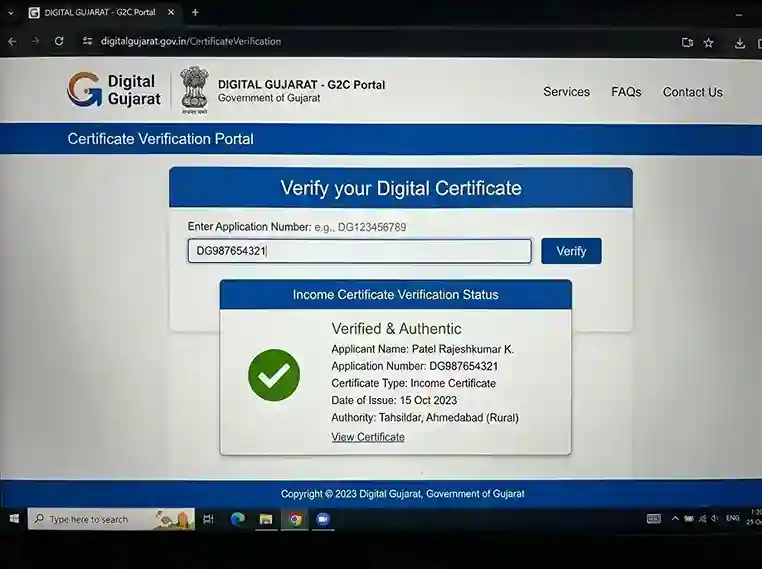
The Digital Gujarat Certificate Verification portal at digitalgujarat.gov.in | enter any certificate's application number to verify authenticity instantly, no login needed.
What is the Digital Gujarat Verification Portal?
The Digital Gujarat Verification Portal is a free, public-facing service built into www.digitalgujarat.gov.in | the Government of Gujarat's official citizen services platform | that lets anyone instantly confirm whether a Gujarat government certificate is genuine and officially issued. It is managed by the Revenue Department, Government of Gujarat, and hosted by the National Informatics Centre (NIC).
Every certificate issued through the Digital Gujarat Portal | income certificate, caste certificate, EWS certificate, NCL certificate, domicile certificate, character certificate, farmer certificate, senior citizen card, disability certificate, and more | carries a unique application number and a digitally signed QR code. Using either of these, any person | applicant, employer, university, bank, or government officer | can verify authenticity in under 30 seconds, with no login and no registration required.
The verification service is accessible from the main Digital Gujarat homepage under Citizen Services quick links, alongside Digital Locker, e-Payment, and Download Issued Documents | but is usable by anyone, even without a portal account. It is also accessible directly from the Citizen Services section. Verified certificates carry a digital signature from the issuing Mamlatdar or Revenue Officer and are legally valid under the Information Technology Act, 2000, making them equivalent to physically stamped paper certificates.
Two Methods to Verify on the Digital Gujarat Verification Portal
Method 1: Application Number
Enter the certificate's unique application number (printed on every Digital Gujarat certificate) on the Certificate Verification page. Works for all portal-issued certificates | income, caste, EWS, NCL, domicile, character, farmer, and more. Enter the number exactly as printed, solve the captcha, and click Verify.
Method 2: QR Code Scan
Scan the QR code printed on any Digital Gujarat certificate using your smartphone camera, Google Lens, or any QR reader app. The QR code contains a unique verification URL | scanning it instantly opens the verification result for that specific certificate. Ideal for on-the-spot verification by employers, universities, or government offices.
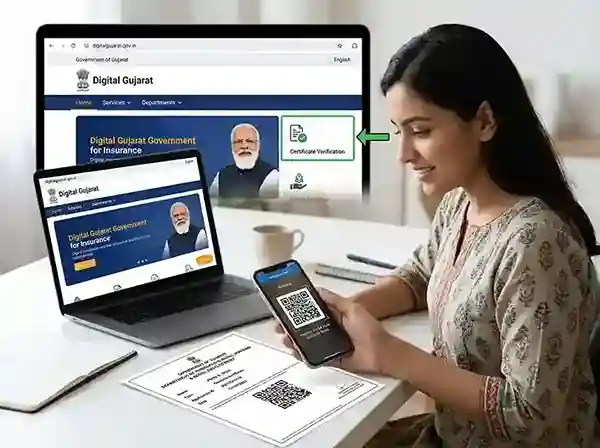
The Certificate Verification quick link on the Digital Gujarat Portal homepage (digitalgujarat.gov.in) | accessible without logging in, under the Citizen Services section.
How to Verify a Certificate on Digital Gujarat | Step by Step
Here is the complete step-by-step process to verify any Gujarat certificate via the Digital Gujarat Certificate Verification service using Method 1 (Application Number):
Sample mockup only. Open the official portal for real verification →
Open the Digital Gujarat Portal | no login needed
Go to www.digitalgujarat.gov.in. Certificate Verification is a completely public service | no login or account registration is required. You can also open it directly on the mobile browser without the app.
Click "Certificate Verification" under Citizen Services
On the Digital Gujarat homepage or dashboard, look for the Certificate Verification quick link in the Citizen Services quick-access section | alongside Digital Locker and e-Payment. On mobile, scroll down from the main menu or search "certificate verification" in the site's search bar.
Find the application number on your certificate
The Application Number is printed on every Digital Gujarat certificate | usually near the top, bottom, or beside the QR code. For PDF certificates downloaded from the portal, the number also appears in your Digital Gujarat dashboard → My Services. Application number format is typically alphanumeric with a prefix, such as DGJ-INC-2026-AHM-XXXXX for income certificates, with similar formats for caste, EWS, domicile, and other certificates.
Enter the application number exactly and solve the captcha
Type or paste the application number exactly as printed, including all letters and hyphens. Solve the image captcha | if unclear, click the refresh icon to get a new one. Then click the Verify (or Submit) button.
Read the verification result
✅ Verified | Genuine: The portal displays certificate type, holder name, issue date, issuing Mamlatdar, and validity period. The certificate is authentic and officially issued. ❌ Certificate Not Found: The number may be incorrect, the certificate may have been issued offline, it may be recently approved (wait 24 hours), or it may be a forgery. See the troubleshooting section below for fixes.
How to Verify via QR Code Scan (Fastest Method)
Every Digital Gujarat certificate | whether downloaded as a PDF or received on paper | contains a unique QR code printed on it. Scanning this QR code is the fastest way to verify a Gujarat certificate: no application number needed, no captcha, instant result.
Every Digital Gujarat certificate has a unique, digitally signed QR code
Open your smartphone camera (or Google Lens, Paytm QR scanner, or any QR reader). Point it at the QR code on the certificate. Tap the notification link | the Digital Gujarat Certificate Verification page opens instantly, showing the certificate details and confirming authenticity.
PDF certificate on a computer screen? Use Google Lens on your phone to scan the QR code from the screen. Or take a screenshot and use Google Lens from the Google Search bar → camera icon → screenshot. Zoom into the QR code at 150% before scanning for better recognition.
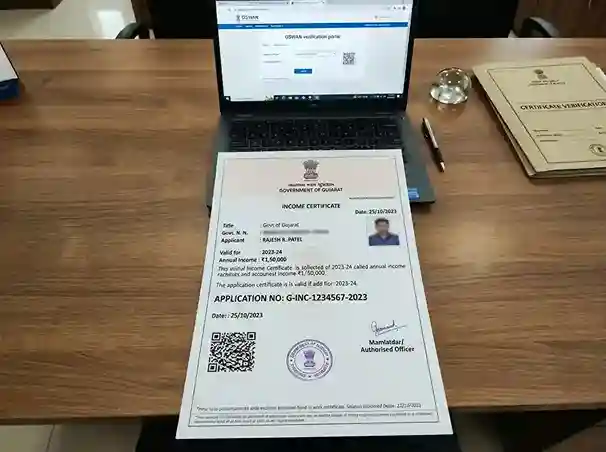
Types of Gujarat certificates that can be verified | income certificate, caste certificate, EWS certificate, and domicile certificate | all carry a unique application number and QR code for digital verification.
Which Gujarat Certificates Can Be Verified Online?
All certificates issued through the Digital Gujarat Portal (digitalgujarat.gov.in) can be verified online using the Certificate Verification service. This includes all Revenue Department certificates, welfare scheme documents, and departmental certificates processed through the portal:
Income Certificate
Aavak Praman Patra | 1 yr validity (scholarship) / 3 yr (general)
Caste Certificate (SC/ST)
Jati Praman Patra | verify SC, ST certificates online
Caste Cert (OBC/SEBC)
Socially Educationally Backward Class certificate
Domicile Certificate
Vas Praman Patra | verify Gujarat domicile online
EWS Certificate
Economically Weaker Section | 1 year validity
NCL Certificate
Non-Creamy Layer | for OBC/SEBC, verify income limit
Character Certificate
Charitra Praman Patra | for jobs and admissions
Senior Citizen Card
Vansha Praman Patra | age verification
Farmer Certificate
Khedut Praman Patra | for agricultural schemes
Disability Certificate
Viklaang Praman Patra | Social Justice dept.
Unreserved Caste Cert
General category without income | panchayat
All Revenue Certificates
Any certificate issued via the Digital Gujarat portal
For death certificates and birth certificates, verification is done through the CRS portal (crs.guj.nic.in) | not the Digital Gujarat Portal | since civil registration in Gujarat is managed by the Civil Registration System. The QR code on birth/death certificates links to the CRS verification page, not the Digital Gujarat verification page.
Gujarat Certificate Validity | How Long Are Certificates Valid?
One of the most-searched questions about the Digital Gujarat Verification Portal is about certificate validity periods | particularly whether the income certificate is valid for 1 year or 3 years. Here is the definitive answer based on Gujarat government norms:
| Certificate Type | Validity (Scholarships) | Validity (General Use) | Notes |
|---|---|---|---|
| Income Certificate (Aavak Praman Patra) | 1 year (current AY only) | 3 years | Must be renewed each year for scholarship applications. Same certificate usable for multiple scholarships in the same year. |
| EWS Certificate | 1 year from issue date | 1 year from issue date | EWS certificates must be renewed annually for both scholarship and general use. Income must be verified fresh each year. |
| Caste Certificate (SC/ST/OBC/SEBC) | Lifetime (once issued) | Lifetime | Caste does not change | certificate issued once is valid for life. Verify online to confirm it was issued officially. |
| NCL Certificate (Non-Creamy Layer) | 1 year (current AY only) | 1 year | Income limit verified annually. Must be renewed each year like the income certificate. |
| Domicile Certificate | Lifetime | Lifetime | Place of residence once established is valid for life. Verify online to confirm it is authentic. |
| Character Certificate | 6 months (typical) | 6 months (typical) | Most institutions accept a character certificate issued within 6 months of the application date. |
| Senior Citizen Card | — | Lifetime | Issued once age is verified (60+ years). Valid for life unless address changes. |
Gujarat Income Certificate Validity | 1 Year or 3 Years? Complete Answer
The confusion around income certificate validity in Gujarat arises because the same certificate serves different purposes with different validity rules:
- For Digital Gujarat scholarships (Pre-Matric, Post-Matric, MYSY, EBC/EWS scholarship): the income certificate must be issued for the current academic year. You cannot reuse last year's income certificate | it will be flagged as expired during document verification. Effectively, income certificate validity for scholarship purposes is 1 year (current AY).
- For general use | bank loans, college admissions, welfare schemes, ration card applications, ACPC admission counselling | a Gujarat income certificate is valid for 3 years from the date of issue. You do not need a new one every year for these purposes.
- For ACPC counselling (engineering and other professional college admissions in Gujarat): the income certificate must be from the current year or within 1 year of the application, as per ACPC guidelines.
EWS Certificate Validity Gujarat | Verified Answer
The EWS certificate in Gujarat is valid for 1 year from the date of issue | for all purposes, including scholarship applications and general use. Unlike the income certificate (which has a 3-year general validity), EWS certificates expire annually because the family's income and asset situation is reassessed each year. To verify the EWS certificate validity and issue date, use the Digital Gujarat Verification Portal with the application number or QR code scan.
Certificate-Specific Verification Guides
Here is how to verify each major Gujarat certificate type on the Digital Gujarat Certificate Verification portal, with the specific validity and special considerations for each:
How to Verify Income Certificate Online in Gujarat
To verify a Gujarat income certificate online: go to digitalgujarat.gov.in → Certificate Verification → enter the application number from your income certificate (Aavak Praman Patra) → solve captcha → click Verify. The result shows the applicant's name, income amount, issue date, issuing Mamlatdar, and validity.
Use income certificate verification to confirm: (1) whether your income certificate is still valid (check issue date | add 1 year for scholarship use, 3 years for general use), (2) whether the income figure matches your application, and (3) whether it was officially issued by the correct Mamlatdar office.
If a college or scholarship authority asks you to verify your income certificate, perform the QR scan in front of them | the live result shows "Verified | Genuine" along with all details, which is legally sufficient under the IT Act 2000.
How to Verify EWS Certificate in Gujarat (EWS Verification)
The EWS certificate verification process on Digital Gujarat is identical to income certificate verification: go to digitalgujarat.gov.in → Certificate Verification → enter the EWS certificate application number → solve captcha → Verify. Or scan the QR code on the EWS certificate. The result shows issue date and "Valid Upto" | this is 1 year from issue.
EWS certificates are issued by the Mamlatdar under the 103rd Constitutional Amendment (2019) and give General category candidates access to 10% reservation. Verifying before submission ensures the certificate has not expired (1-year validity) and was genuinely issued. Annual renewal is necessary | apply fresh at digitalgujarat.gov.in for EWS certificate renewal each year before applying for scholarships or admissions.
| Field | Detail |
|---|---|
| Verification portal | digitalgujarat.gov.in → Certificate Verification |
| Validity | 1 year from date of issue |
| Income limit | Family income ≤ ₹8 lakh/year from all sources |
| Issued by | Mamlatdar (Revenue Department, Gujarat) |
| Purpose | 10% reservation in education & jobs (General category) |
| Renewal | Required annually | apply fresh at digitalgujarat.gov.in |
How to Verify Caste Certificate Online in Gujarat
To verify a Gujarat caste certificate online | whether SC, ST, OBC, or SEBC | go to digitalgujarat.gov.in → Certificate Verification → enter the application number → Verify. Caste certificates issued via the Digital Gujarat portal carry a QR code for instant verification. Caste certificates are valid for life once issued | caste does not change. Verification is used by universities, employers, and government departments to confirm the certificate was officially issued by the Revenue Department, not forged.
For the ST Validity Certificate (required for government job applicants claiming ST benefits), a separate process applies through the Scrutiny Committee | verify at the issuing authority's office. For all other caste certificates, the Digital Gujarat Verification Portal is the definitive verification service.
How to Verify Character Certificate from Digital Gujarat
The character certificate (Charitra Praman Patra) from Digital Gujarat can be verified using the same Certificate Verification service: digitalgujarat.gov.in → Certificate Verification → enter the character certificate application number. Character certificates are typically valid for 6 months from the date of issue | most educational institutions and employers require the certificate to be issued within 6 months of the application date.
To apply for a character certificate in Gujarat, go to digitalgujarat.gov.in → Citizen Services → Character Certificate. Documents required include Aadhaar card, proof of residence, identity proof, and self-declaration. The Mamlatdar issues the certificate after verification, usually within 7–14 working days, with a QR code for online verification.
For districts like Sabarkantha, Ahmedabad, Surat, Vadodara, and others, the character certificate is issued by the local Mamlatdar through the same Digital Gujarat portal process | the application number format and verification process is identical across all Gujarat districts.
How to Verify Domicile Certificate Gujarat Online
To verify a domicile certificate (Vas Praman Patra) in Gujarat: go to digitalgujarat.gov.in → Certificate Verification → enter the domicile certificate application number → Verify. Domicile certificates are valid for life | they confirm that the holder is a resident of Gujarat and are required for scholarships, ACPC admissions, government jobs, and other state benefits. Verify the certificate number to confirm it was officially issued before submitting to any institution.
Who Uses the Digital Gujarat Certificate Verification Portal and Why
The Digital Gujarat Verification Portal serves multiple stakeholders across Gujarat's education, employment, banking, and government ecosystem:
- Universities and colleges | verify income and caste certificates submitted by scholarship applicants, fee concession claimants, and students seeking reserved category admission seats
- DSWO offices (District Social Welfare Officer) | verify certificates before approving Pre-Matric, Post-Matric, and other scholarship disbursements through the Digital Gujarat portal
- Employers | verify domicile and character certificates during hiring for government or regulated private-sector roles
- Government departments | cross-check certificates in welfare scheme applications, ration card processing, land mutation, and ACPC admission counselling
- Banks and financial institutions | verify income certificates for loan applications, crop insurance, and subsidy eligibility under PM schemes
- Citizens | confirm their own certificate's validity, issue date, and authenticity before submitting to an institution to avoid rejection
- Anti-fraud investigation | Mamlatdar offices and the District Collector's office use the portal to identify and investigate forged certificates
Verification Issues and Fixes | Complete Troubleshooting Guide
"Certificate Not Found"
Application number incorrect, certificate issued offline, database sync delay, or potential forgery.
Re-enter exactly as printed | check for offline issue
Re-type the full application number including all prefix letters and hyphens, exactly as printed on the certificate. If still not found and the certificate was processed at a Mamlatdar office or Jan Seva Kendra (not online), it may not be in the digital database. Contact the issuing Mamlatdar office directly. If recently approved, wait 24 hours and retry.
QR code not scanning
Blurry print, screen glare, glossy paper, or phone camera cannot focus on the QR code.
Use Google Lens + improve lighting
Switch to Google Lens for more accurate QR scanning. For PDF on screen, zoom in to 150% before scanning with another device. Ensure good ambient light. Hold the phone at 90° to avoid glare on glossy certificate prints. Alternatively, take a screenshot of the QR code area and use Google Lens to scan the screenshot.
Captcha image not loading
Ad-blocker, browser extension, or network issue blocking the captcha image on the verification page.
Chrome Incognito mode
Open Chrome Incognito (Ctrl+Shift+N on desktop, or three-dot menu → New Incognito Tab on mobile). This disables extensions and ad-blockers. Alternatively, disable your ad-blocker temporarily or switch from Wi-Fi to mobile data. Reload the page after disabling extensions.
Office refuses digital certificate
Government officer or institution is unfamiliar with digital certificate acceptance rules under IT Act 2000.
Perform live QR scan + cite IT Act 2000
Scan the QR code live in front of the officer | the live result showing "Verified | Genuine" on digitalgujarat.gov.in is legally binding proof. Cite IT Act 2000, Section 4 (legal recognition of electronic records). If refused, escalate to the District Collector's grievance cell or file a grievance at digitalgujarat.gov.in/Grievance. Helpline: 1800-233-5500.
Newly approved certificate fails verification
Database sync delay | newly issued certificates take time to appear in the verification database.
Wait 24 hours and retry
Newly approved certificates may take up to 24 hours to sync in the verification database. Use the final application number (not a draft or acknowledgement number). Log into your Digital Gujarat dashboard → My Services to confirm the status shows "Approved" and to get the correct final application number.
Certificate shows expired on verification
Certificate was issued more than 1 year ago (for EWS/NCL/income cert for scholarship) or more than 3 years ago (income cert for general use).
Apply for fresh certificate at Digital Gujarat
Log in to digitalgujarat.gov.in → Citizen Services → apply for a fresh Income / EWS / NCL certificate. Processing time: 7–14 working days. Track status at the portal under My Services. Do not submit an expired certificate | it will be rejected during scholarship verification.
How to Download Certificates from Digital Gujarat Portal
Verification and downloading are two different services on the Digital Gujarat Portal. To download a Gujarat certificate after it has been approved:
- Log in to digitalgujarat.gov.in with your registered mobile number and password
- Go to My Services → Service Requests
- Find the approved application and click Download Certificate or View Certificate
- The PDF certificate opens with a QR code and digital signature embedded
- Save the PDF | this is the official certificate, verifiable online at any time
Alternatively, use the Download Issued Documents quick link on the Digital Gujarat dashboard | available after login. The Digital Gujarat App (Sugam App) on Android and iOS also allows certificate download directly from your mobile.
Related Certificate & Portal Guides
Income Certificate Gujarat
Apply, validity, documents | complete guide
Caste Certificate
SC / ST / OBC / SEBC | online apply
EWS Certificate Gujarat
Apply, validity, income limit details
NCL Certificate (OBC)
Non-Creamy Layer | apply & verify
Domicile Certificate
Vas Praman Patra | apply online
Death Certificate Gujarat
CRS portal | apply & verify
DigiLocker Guide
Store & share certificates digitally
All Gujarat Certificates
Complete hub | every certificate guide
Certificate Verification Gujarat | Full FAQ (15 Questions)
These questions cover every query pattern from search data | for SEO, GEO (AI search), and AEO (answer engine) optimisation:
The Digital Gujarat Verification Portal is a free public service at digitalgujarat.gov.in that lets anyone verify whether a Gujarat government certificate is genuine. No login required. Enter the application number or scan the QR code on the certificate. Results appear in under 30 seconds. It covers income certificates, caste certificates, EWS certificates, NCL certificates, domicile, character, farmer, disability, senior citizen cards, and all other portal-issued certificates.
Steps to verify on Digital Gujarat: (1) Go to www.digitalgujarat.gov.in | no login needed. (2) Click Certificate Verification under Citizen Services. (3) Enter the application number from the certificate. (4) Solve the captcha. (5) Click Verify. Or scan the QR code on the certificate with your phone camera. Free. Under 30 seconds.
To verify income certificate online Gujarat: go to digitalgujarat.gov.in → Certificate Verification → enter the income certificate application number → solve captcha → Verify. No login needed. The result shows applicant name, income figure, issue date, issuing Mamlatdar, and validity period. You can also scan the QR code on the income certificate for instant verification. The income certificate is valid 1 year for scholarships and 3 years for general use.
Gujarat income certificate validity: 1 year for Digital Gujarat scholarships (Pre-Matric, Post-Matric, MYSY | must be issued for the current academic year and renewed every year). 3 years for general use (bank loans, college admissions, ACPC counselling in the same year, welfare schemes). Always check the specific requirement of the scheme or institution before submitting. Verify the issue date on digitalgujarat.gov.in → Certificate Verification to calculate the remaining validity.
To check whether your Gujarat income certificate is still valid: (1) Go to digitalgujarat.gov.in → Certificate Verification. (2) Enter your income certificate application number. (3) The result shows the issue date and "Valid Upto" date. If for scholarship: must be issued in the current academic year. If for general purposes: valid for 3 years from issue. If expired, apply for a fresh certificate at digitalgujarat.gov.in.
To verify EWS certificate Gujarat: digitalgujarat.gov.in → Certificate Verification → enter EWS certificate application number → Verify. Or scan the QR code on the EWS certificate. EWS certificate validity in Gujarat is 1 year from the date of issue | for all purposes. Annual renewal is required. Income limit: family income ≤ ₹8 lakh/year. Issued by Mamlatdar. Apply fresh at digitalgujarat.gov.in each year before scholarship or admission deadlines.
To verify Gujarat caste certificate online: go to digitalgujarat.gov.in → Certificate Verification → enter the caste certificate application number → solve captcha → Verify. Works for SC, ST, OBC, and SEBC caste certificates issued through the Digital Gujarat portal. Caste certificates are valid for life once issued. QR code scan is also available for instant verification. Certificates issued offline (at Mamlatdar or JSK before the digital portal) may not be in the online database.
To verify a character certificate from Digital Gujarat: go to digitalgujarat.gov.in → Certificate Verification → enter the character certificate (Charitra Praman Patra) application number → solve captcha → Verify. Character certificates are valid for approximately 6 months | most institutions require it to be issued within 6 months of the application date. Documents required for character certificate include Aadhaar card, address proof, and self-declaration. Issued by Mamlatdar in 7–14 working days.
To verify domicile certificate Gujarat online: digitalgujarat.gov.in → Certificate Verification → enter the domicile certificate application number → Verify. Or scan the QR code on the certificate. Domicile certificates (Vas Praman Patra) are valid for life once issued. They are required for scholarships, ACPC admissions, government jobs, and other state benefits. Certificates issued offline may not be in the online verification database | contact the issuing Mamlatdar office if not found.
Gujarat death certificate verification is done through the CRS portal (crs.guj.nic.in) | not the Digital Gujarat Portal | because civil registration (birth, death, marriage) in Gujarat is managed by the Civil Registration System. Go to crs.guj.nic.in → Certificate Verification → enter the death certificate registration number. The QR code on a death certificate links to the CRS verification page, not the Digital Gujarat verification page.
"Certificate Not Found" means: (1) Application number entered incorrectly | re-check every character. (2) Certificate issued offline (Mamlatdar / Jan Seva Kendra) | not in digital database. (3) Certificate recently approved | wait 24 hours for database sync. (4) Certificate may be forged | report to the issuing Mamlatdar office or District Collector. Helpline: 1800-233-5500. Never rely on a certificate that fails online verification for official submissions.
Yes. Certificate Verification on Digital Gujarat is completely free and no login is required. Anyone | employer, university, bank, government office, or citizen | can verify any Gujarat certificate using the application number or QR code. This is by design: the public verification service enables employers, DSWO offices, and universities to independently verify certificates submitted by applicants.
To download Gujarat certificate from Digital Gujarat: log in at digitalgujarat.gov.in → go to My Services → Service Requests → find your approved application → click Download Certificate. The PDF certificate includes a QR code and digital signature. You can also download from the Download Issued Documents quick link on the dashboard or via the Sugam Digital Gujarat mobile app. Store the PDF in DigiLocker for permanent access.
Yes. Digital Gujarat certificates are legally valid under the Information Technology Act 2000, Section 4 (legal recognition of electronic records). A digitally signed, QR code-verified certificate from the Digital Gujarat Portal is legally equivalent to a physically stamped paper certificate and must be accepted by government offices, universities, banks, and courts. If any office refuses, cite IT Act 2000 and escalate to the District Collector's grievance cell or call 1800-233-5500.
For ACPC engineering admission counselling in Gujarat, the income certificate must be issued in the current academic year or within 1 year of the application, as per ACPC guidelines. The income certificate from Gujarat is generally valid for 3 years for general purposes, but ACPC typically requires a fresh certificate for the year of admission. Always verify the issue date on the Digital Gujarat Verification Portal before ACPC document submission. Check the current year's ACPC information brochure for exact validity requirements.