Millions of ration cards were fake or inactive. Dead people were still listed. Families who had moved were still collecting grain at old addresses. The government's answer was e-KYC | verify every cardholder using Aadhaar, or stop the ration. This guide explains the full process, how to check your status, and what to do if you missed the deadline.
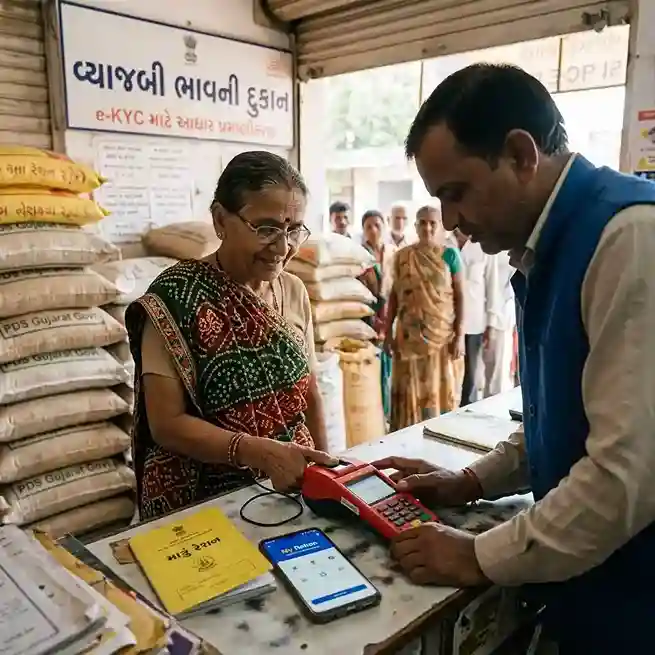
Ration card e-KYC is completed either through Aadhaar OTP online, face authentication on the My Ration app, or biometric scan at the Fair Price Shop's e-POS machine.
e-KYC stands for electronic Know Your Customer. For ration cards, it means the government verifies that the person listed on the card is alive, real, and still living at the registered address. The verification uses Aadhaar | India's biometric identity system.
Before e-KYC, ration cards were verified mostly on paper. Supervisors visited houses. Dealers noted names in registers. The system was easy to manipulate. Crores of ration cards were active for people who had died, migrated, or were simply fictitious. Families with good incomes kept low-category cards from decades ago.
e-KYC fixes this. Your Aadhaar is linked to your ration card. Then you verify yourself | either by OTP on your phone, face scan on a camera, or fingerprint at the ration shop. Once verified, the government knows you are real. If you do not verify, the card is flagged and benefits stop.
The e-KYC process is not a one-time event forever. The government has indicated that e-KYC must be renewed periodically | the current guidance suggests once every five years | so keeping your Aadhaar mobile number active is important for future renewal cycles too.
The Department of Food and Public Distribution made ration card e-KYC mandatory nationwide for three clear reasons.
First: Ghost beneficiaries. Survey after survey found that a significant number of ration cards were held by people who had died or left the area. Food grain was being diverted by dealers or collected by others. E-KYC removes these ghost entries because a dead person cannot present a fingerprint or face scan.
Second: Duplicate cards. Some families held multiple ration cards | one for the city, one for the village, or one per address after a family split. E-KYC ties each person's Aadhaar to a single card. Duplicates get detected and cancelled.
Third: Ineligible beneficiaries. People who now earn above the income limit, own cars, or have government jobs still held legacy BPL or PHH cards issued years ago. The government uses e-KYC as an opportunity to cross-check income data and clean the beneficiary list.
Every person listed on a ration card must complete e-KYC individually. This is not a one-per-family process. Each family member has their own Aadhaar and must be verified separately.
APL (NPHH) cardholder families that do not receive food grain subsidies may not be required to do e-KYC in all states | but many states have included them in the verification drive anyway. Check your state portal to confirm.
The process is intentionally simple. You need very few things:
No income certificate, caste certificate, or address proof is required separately for e-KYC. The Aadhaar already contains all the identity data the government needs.
The online process works for anyone whose Aadhaar is linked to an active mobile number. If your number is not active, go offline instead.
Gujarat is one of the most active states in rolling out ration card e-KYC. The state has multiple routes | the My Ration mobile app, the PDS+ app, e-Gram centres, Mamlatdar offices, and a doorstep service through India Post.
The PDS+ app is used by Village Computer Entrepreneurs (VCEs) at e-Gram centres at the village level, and by staff at Mamlatdar-Zonal offices at the taluka level. This route is for people who cannot complete face or OTP verification on their own.
Under a unique MoU between Gujarat's Food and Civil Supplies Department and the Department of Posts, postmen can complete ration card e-KYC at your doorstep. This service is free. It uses the same biometric system. It is particularly useful for elderly, disabled, or bedbound family members who cannot travel.
Contact your nearest post office or ask your postman when the next camp is scheduled in your area. Gujarat's postal circle has over 8,800 post offices and has already completed doorstep e-KYC for more than 2 lakh ration card holders through this route.
If you cannot complete e-KYC online | because your mobile number is not linked to Aadhaar, or you do not have a smartphone | the offline route at your Fair Price Shop (ration dealer) is the most direct option.
If the FPS dealer refuses to help or says the machine is not working, you can also visit:
| State | Official Portal | App Option | Key Notes |
|---|---|---|---|
| Gujarat | dcs-dof.gujarat.gov.in | My Ration app, PDS+ app | Doorstep via India Post; e-Gram VCE assistance available |
| Bihar | epds.bihar.gov.in | My Ration app, Mera eKYC app | OTP + face scan; RTPS centres also assist |
| Odisha | pdsodisha.gov.in | My Ration app | 20.58 lakh cards suspended for non-compliance; extensions given |
| Karnataka | ahara.karnataka.gov.in | My Ration app | FPS biometric verification widely used |
| Andhra Pradesh | epds.ap.gov.in | My Ration app | Face e-KYC system introduced for faster processing |
| Kerala | civilsupplieskerala.gov.in | Mera eKYC app | Village officers assist with offline e-KYC |
| Rajasthan | food.rajasthan.gov.in | My Ration app | Deadline extended multiple times; FPS route preferred |
| Haryana | haryanafood.gov.in | My Ration app | Online OTP route fully functional |
| West Bengal | wbpds.gov.in | My Ration app | BDO offices provide assisted e-KYC |
| All States | nfsa.gov.in | My Ration (central) | Central portal for status check across states |
After completing e-KYC, the database update may take up to 24 hours. Then check the status using one of these methods.
The deadline for ration card e-KYC has been extended multiple times since the initial March 2025 target. Here is the current picture as of June 2026:
| State | Initial Deadline | Extended To | Action If Missed |
|---|---|---|---|
| Gujarat | December 2024 | June 30, 2025 (then rolling) | Ration suspended; name deletion on prolonged non-compliance |
| Odisha | August 2024 | Extended to June 2025 | 20.58L cards suspended; appeals process open |
| Bihar | March 2025 | Extended into 2026 | Benefits suspended until completed |
| Karnataka | March 2025 | Rolling | check portal | Benefits suspended pending verification |
| All States | March 31, 2025 | State-specific | check locally | Card flagged "unauthenticated"; benefits stop |
Missing the e-KYC deadline is not a minor issue. The consequences are immediate and can cascade across multiple government schemes.
Biometric failure is common among elderly persons, daily labourers (worn fingerprints), and very young children. This is a known problem and the government has solutions for it.
If your index fingerprint fails, try the thumb, middle finger, or any other finger. The e-POS machine accepts any biometric match in the UIDAI database.
If all fingerprints fail, ask the FPS dealer or CSC operator to switch to iris scan. Not all e-POS machines support iris | if yours does not, go to a CSC or Aadhaar enrolment centre that has an iris scanner.
In Gujarat, the PDS+ app and My Ration app both support face authentication as an alternative to fingerprint. If biometrics at the FPS fail, try face authentication through the app. The app camera compares your live face to your Aadhaar photograph.
If you have not updated your biometrics in over 10 years, or if your Aadhaar was enrolled when you were very young, the stored data may no longer match. Visit a UIDAI Aadhaar Enrolment Centre and update your biometrics. This is free and takes about 15 minutes. After updating, return to the FPS for e-KYC.
For genuine cases where all biometric options fail | severely arthritic persons, persons with physical deformities, or persons with visual impairment who cannot do iris scan | contact the District Supply Officer. The government has exception-based manual verification procedures for these cases.
Students who apply for Digital Gujarat scholarships often ask whether their ration card e-KYC and their scholarship Aadhaar verification are the same thing. They are not | but they are connected in important ways.
Ration card e-KYC verifies your identity for the Public Distribution System. It links your Aadhaar to your ration card in the Food Department's database. Once done, the Food Department knows you are real and eligible.
Scholarship Aadhaar verification on the Digital Gujarat portal links your Aadhaar to your scholarship application. The portal verifies your identity through UIDAI's API | either by OTP or face scan | at the time of applying. This is independent of ration card e-KYC.
You need both, but separately. Completing ration card e-KYC does not automatically complete scholarship Aadhaar verification, and vice versa.
However, there is an important indirect connection. Many scholarship schemes | particularly SC/ST and OBC post-matric schemes | use BPL ration card status as a criterion for priority selection. If your ration card is deactivated because e-KYC is not done, your BPL status becomes unverifiable at the institutional level. This can delay or complicate your scholarship processing.
The second connection is through NPCI seeding. Your Aadhaar must be seeded in the NPCI system for DBT payments from both the scholarship and ration card channels. If your Aadhaar is inactive or your mobile number is deregistered, both your scholarship payment and your ration card e-KYC will fail at the same time.
Keep your Aadhaar mobile number active. That one step protects both your ration card e-KYC and your scholarship DBT payment.
Can I do ration card e-KYC without a smartphone?
Yes. Visit your nearest Fair Price Shop and ask the dealer to complete biometric e-KYC using the e-POS machine. You only need to bring your Aadhaar card. No smartphone is needed. The dealer's machine handles everything. You can also go to a Common Service Centre (CSC / Jan Seva Kendra) for assisted e-KYC.
Can someone else do ration card e-KYC on my behalf?
No. e-KYC requires your own biometric | your fingerprint, iris, or face. No one else can provide those for you. However, a family member can accompany you to the FPS or CSC and help with the process. In Gujarat, you can also request a doorstep visit through India Post's free service if you cannot travel.
My mobile number is not linked to Aadhaar. Can I still do e-KYC?
Yes, but not online. If your mobile number is not registered with UIDAI, OTP-based e-KYC will not work. Go offline | visit your Fair Price Shop for biometric fingerprint or iris verification, or a CSC for face authentication. Alternatively, first update your mobile number at a UIDAI Aadhaar enrolment centre (free), then come back and complete OTP-based e-KYC online.
Does every family member need to be present for e-KYC, or can the head of family do it for all?
Each family member needs to be individually verified because e-KYC requires that person's own biometric or OTP. However, not all members need to be present at the same time. You can take one member at a time. The head of family can also carry all members' Aadhaar cards and complete OTP verification for each one if all their mobile numbers are accessible.
How do I check ration card e-KYC status in Gujarat?
To check ration card e-KYC status in Gujarat, visit dcs-dof.gujarat.gov.in and enter your ration card number. The portal shows each family member's e-KYC status. You can also check through the My Ration app under the Aadhaar Seeding section. The ration dealer can also show you the status on the e-POS machine at the Fair Price Shop.
What is the e-KYC status in Odisha and what happened to suspended cards?
In Odisha, the government suspended over 20.58 lakh ration cards for failure to complete e-KYC by the June 2025 deadline. The e-KYC drive started in August 2024. Suspended cardholders can still restore their card by completing e-KYC at the nearest Fair Price Shop or through the Odisha PDS portal at pdsodisha.gov.in. Check with your local supply office for the current restoration process.
Is ration card e-KYC free or is there a fee?
Ration card e-KYC is completely free. There is no official fee charged by the government for any method | online, app, FPS biometric, or CSC-assisted. CSCs may charge a small convenience fee (usually ₹20 to ₹30) for their assistance service, but the core e-KYC itself has no government charge. The India Post doorstep service in Gujarat is also free.
If my ration card was suspended for missing e-KYC, can I restore it?
Yes. A suspended ration card can be restored by completing e-KYC. Visit your Fair Price Shop for biometric verification. If the FPS machine shows your card as suspended, go to the Taluk or Mamlatdar office and complete the e-KYC there with official assistance. Once the database updates (within 24 to 72 hours), grain distribution resumes from the next monthly cycle. Cards are only permanently deleted after prolonged inaction | typically months after suspension.
Does ration card e-KYC need to be repeated every year?
No, not every year. Current government guidance indicates that ration card e-KYC is valid for five years once completed. After five years, re-verification may be required. However, if you move to a new address, change your ration card, or add new family members, a fresh e-KYC for the changed details is needed at that point.
Last updated: June 2026. This is an independent educational resource. Not affiliated with the Government of India or any state government. e-KYC deadlines change without notice. Always verify current dates at your state's official Food and Civil Supplies portal or nfsa.gov.in before relying on this information.